Pages

Wednesday, April 15, 2015

VMWare vMotion Migration Process

vMotion is used to move a powered on virtual machine from one host to another

VMWare vMotion can be be used to :

  • Improve overall hardware utilization
  • Allow continued virtual machine operation while accomodating scheduled hardware downtime.
  • Allow vSphere Distributed Resource Scheduler(DRS) to balance virtual machines between hosts.
How vMotion Migration works:

vMotion Migration is achieved by moving the memory state from one host to another across the vMotion network which is private, non-routed, gigabit or faster network connection between two hosts involved in the vMotion migration.

However, vMotion can be done only if certain requirements are met:

1. The hosts between which the vMotion need to be performed must have a shared storage.
2. The participating hosts must have identical networks.

In addition to that, requirements for VM are:

1. A virtual machine should not have connection to a virtual device with a local image mounted.
2. A virtual machine must not have connection to an internal switch(vSwitch with zero uplinks)
3. A virtual machine must not have CPU affinity configured.

Moreover, source and destination hosts must have:

1. Visibility to all storage (Fiber Channel, iSCSI or NAS) used by the virtual machine.
2. At least a gigabit ethernet network
  • Four concurrent vMotion migration on a 1 Gbps network
  • Eight concurrent vMotion migration on a 10 Gbps network
3. Access to same physical network
4. Compatible CPUs


Tuesday, March 31, 2015

Open vSwitch flows for L2 Switching

All the SDN controllers have pre-written code for L2 switching. However, for this you need to connect the controller to OVS. If the topology is complicated and all you want to achieve is simple L2 forwarding through OVS, we can just install the flows and forget the controller.

Let's understand what flows are required for a simply topology shown below.

 (10.0.0.1)Host----------(port_no=1) OVS (port_no=2)-------Host(10.0.0.2)

Whenever a host tries to ping another machine, it search for a mac-address of the destination in its mac-address cache. If it does not find it, it sends an arp request to the gateway, which may be a router or a switch. In our topology, the first device that is connected to the host is the OVS. So, flows for arp are required which sends the arp request to the correct destination.
For the topology shown above, the arp flows are as follows:

cookie=0x0, duration=7.096s, table=0, n_packets=0, n_bytes=0, idle_age=7, arp,arp_tpa=10.0.0.2 actions=output:2
cookie=0x0, duration=12.818s, table=0, n_packets=0, n_bytes=0, idle_age=12, arp,arp_tpa=10.0.0.1 actions=output:1

The commands to add them are as follows:

ovs-ofctl add-flow s1 arp,nw_dst=10.0.0.1,actions:output=1
ovs-ofctl add-flow s1 arp,nw_dst=10.0.0.2,actions:output=2

After the host gets an arp reply, it saves the mac-address in its arp cache. When we ping to the same destination next time, icmp packets need to be forwarded to the correct destination.

For the topology shown above, the icmp flows are as follows:

cookie=0x0, duration=84.809s, table=0, n_packets=0, n_bytes=0, idle_age=84, in_port=2,dl_dst=00:00:00:00:00:01 actions=output:1
cookie=0x0, duration=93.627s, table=0, n_packets=0, n_bytes=0, idle_age=93, in_port=1,dl_dst=00:00:00:00:00:02 actions=output:2

The commands to add them are as follows:

ovs-ofctl add-flow s1 in_port=1,dl_dst=00:00:00:00:00:02,actions:output=2
ovs-ofctl add-flow s1 in_port=2,dl_dst=00:00:00:00:00:01,actions:output=1

With these four flows you will be able to establish L2 switching between the hosts without the use of controller.

Wednesday, February 18, 2015

IEEE frames

There are three types of frames defined by IEEE.

1. IEEE 802.3: This is the standard ethernet type defined by IEEE also called Ethernet II or standard ethernet. The main difference from other type of frame is that it has a two byte ether type field which identifies the higher layer protocol data present in the payload field.


The figure below shows the different ether type and the protocol represented by it.
It is interesting to note that the ether type field values are greater than 0x0600(1536 decimal). This is because if the value is less than 0x0600, it represents the length of the payload. If it is greather than or equal to 0x0600, it represents the ether type.


2. IEEE 802.3 wih SNAP:

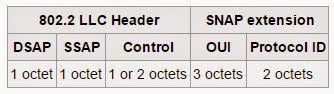
Some upper layer protocols does not have a ether type. To recognize such protocols, the standard ethernet is modified. To accomodate such protocols, SNAP was defined which is an extension of  the IEEE 802.2 Logical Link Control (LLC) to distinguish much more protocols of the higher layer than using of the 8-bit Service Access Point fields (LSAP) present in the IEEE 802.2 header.


The 5-octet SNAP header follows the 802.2 LLC Header if the DSAP and SSAP contains hexadecimal values of AA or AB.

The SNAP header consists of a 3-octet IEEE Organizationally Unique Identifier (OUI) followed by a 2-octet protocol ID. If the OUI is hexadecimal 000000, the protocol ID is the Ethernet type (EtherType) field value for the protocol running on top of SNAP; if the OUI is an OUI for a particular organization, the protocol ID is a value assigned by that organization to the protocol running on top of SNAP.

"Why is a separate sub-network header necessary?" 
                - Source Wikipedia(http://en.wikipedia.org/wiki/Subnetwork_Access_Protocol)

 The answer is that it was to augment a decision that was made during the layout of the LLC header. At the time that the LLC header was being designed it was thought that a single octet (256 possible values) in the header would be enough to specify all the protocol values that vendors would want to register. As the values began to be reserved, it was discovered that the LLC header would soon run out of open values. The hexadecimal AA and AB values were reserved, and an additional header—the SNAP header—was developed; it can support all EtherType values, as well as multiple spaces of private protocol values.

3. IEEE 802.3 wih 802.2 LLC Header:

The purpose of the LLC header is to provide a "hole in the ceiling" of the Data Link Layer. By specifying into which memory buffer the adapter places the data frame, the LLC header allows the upper layers to know where to find the data.

DSAP: The DSAP, or Destination Service Access Point, is a 1 byte field that simply acts as a pointer to a memory buffer in the receiving station. It tells the receiving NIC in which buffer to put this information. This functionality is crucial in situations where users are running multiple protocol stacks, etc...

SSAP: The SSAP, or Source Service Access Point is analogous to the DSAP, and specifies the Source of the sending process.

The Control Byte: Following the SAPs is a one byte control field that specifies the type of LLC frame that this is.

Reference: http://www.wildpackets.com/resources/compendium/ethernet/frame_formats

Sunday, February 8, 2015

VIRTUALENV in Python

virtualenv is a tool to create isolated virtual environments or sandboxes. One project written 2.7 does not affect the other project written in 3.4. Both can reside on the same machine without creating conflict.

Installation commands in Ubuntu:

#Get the installation file
sandesh@sandesh:~$wget https://pypi.python.org/packages/source/v/virtualenv/virtualenv-12.0.7.tar.gz

#the virtualenv zipped file will be downloaded

sandesh@sandesh:~$tar -xvzf virtualenv-12.0.7.tar.gz
sandesh@sandesh:~$cd virtualenv-12.0.7

#install virtualenv
sandesh@sandesh:~/virtualenv-12.0.7$python virtualenv.py myenv

#a new folder called myenv will be created

Use virtualenv in Ubuntu:


# this runs the activate file inside the bin folder
sandesh@sandesh:~/virtualenv-12.0.7$source myenv/bin/activate

#myenv is the name of the virtual environment I created above.

#To install any package inside this virutal environment we execute the following command.
(myenv)sandesh@sandesh:~/virtualenv-12.0.7$pip install django
Collecting django
  Using cached Django-1.7.4-py2.py3-none-any.whl
Installing collected packages: django

Successfully installed django-1.7.4

#we can check what packages are installed inside the virtualenv using following command.
(myenv)sandesh@sandesh:~/virtualenv-12.0.7$ pip freeze
Django==1.7.4

#to get out of the virtualenv

(myenv)sandesh@sandesh:~/virtualenv-12.0.7$ deactivate

sandesh@sandesh-S400CA:~/virtualenv-12.0.7$


Saturday, January 31, 2015

Configuring Web IOU

Web IOU is a very useful software for novice network engineers as it provides the ability to simulate routers as well as switches and give you a simulation environment without taking much memory and processing power as GNS 3 does.

Steps to configure:

1. Create a virtual machine in VMWare Worskstation
          Download VM Ware Workstation. Clik Open under File and select the iou-web file.

2. VMWare Settings:
         In the virtual machine, click on Edit virtual machine settings. Make sure that you have a network adapter (VMNet1 Host Only) . This is a host only adapter which is used to connect to host machine as we need to use web browser in host to access the GUI.


3. Network Settings:
         A static ip address need to be provided to the virtual machine. Since, this is a linux machine, we can use the same command as we use in linux.

Also, In the Properties of your VMWare adapter(as highlighted below) listed in the network connections,set the ip address to 192.169.80.1 and check whether you can ping the above configured ip address. If it pings then you have successfully configured the web-iou.
                                                                                                                                                                   

Sunday, January 4, 2015

Transfer files between Host OS and Mininet VM

It is possible to transfer files between mininet VM and the host OS. The protocol that is used for doing this is called SCP(Secure Copy Protocol).It is based on Secure Shell Protocol(SSH). It is a means of securely transferring computer files between a local host and and a remote host or between two remote hosts.

Follow the steps below to achieve this.


Step 1: Make sure that the mininet VM has a host-only network adapter configured.

In virtualbox network setting make sure that you have a NAT interface enabled that allows you to connect to internet. It will have an ip address like this : 192.168.56.103 ie a class C address.

Step 2: Install WinSCP

Download WinSCP from this link (Download WinSCP) and install the program.

A window like below will appear after installation.

3. Enter the credentials and connect

File Protocol: SCP
Host Name : 192.168.56.103 (or the ip in your host only adapter interface)
User name : mininet
Password : mininet

Click on Login. A window like below will appear.


Friday, January 2, 2015

NX-OS Overview

The cisco NX-OS , next generation operating system was built with modularity, resiliency and serviceability at its foundation. It is based on SAN-OS(Cisco Storage Area Network-Operating System).

Advantage of NX-OS:

1. Unified data center operating system: NX-OS can handle both LAN traffic and SAN traffic.

2. Robust and rich feature set with a variety of Cisco Innovations: Features like ISSU and             PSS(described later)

3. Flexibility and scalability :

4. Modularity : Virtual Device Contexts (VDC)

5. Virtualization :

6. Resiliency

7. IPv4 and IPv6 ip routing and multicast features

8.Comprehensive security , availability, serviceability and management features

Key Features and benefits of NX-OS

1.  Virtual Device Contexts: Available on Cisco Nexus 7000 switches only, these switches can be segmented into multiple virtual devices. These virtual devices function as independent switches and can run independent of each other. VDCs provide benefits like fault isolation, administration plane, seperation of data traffic and enhanced security.

2. Virtual Port Channels(VPCs) : This feature enables a server or switch to use an EtherChannel across two upstream switches without and STP blocked port to enable use of all available uplink bandwidth.

3. Continuous System Operation : Maintenance , upgrades and software certifications can be performed without service interruptions because of the modular nature of NX-OS and features such as In Service Software Upgrade and the ability for processes to restart dynamically.

4. Security : Cisco NX-OS provides outstanding data confidentiality and integrity, supporting standard IEEE 802.1AE link-layer cryptography with 128-bit Advanced Encryption Standard (AES) cryptography. In addition to CTS, there are many additional security features such as access control lists (ACLs) and port-security.

5. Overlay Transport Virtualization (OVT) : Enables layer 2 extension between distributed data centers over any transport layer 3 network.

6. NX-OS Persistant Storage Service :  The PSS is a lightweight database that maintains runtime information state. PSS provides reliable persistant storage to the software components to checkpoint their internal state and data structures enabling non-disruptive restart . If a fault occurs in a process such as OSPF the NX-OS high availability (HA) manager determines best recovery action.


  • Restart a process
  • Switch over to a redundant supervisor module
7. Fabric Path : This is similar to link state protocol which enables each device to build an overall view of the topology. Each device is identified by a swtich id. This eliminates spanning tree to maximize network bandwidth and flexibility.
For more datails on fabric path refer to : Fabric Path